Ilimitado, sob demanda
Execute quantas migrações forem necessárias, sempre que precisar.
Suíte de migração do portal
Migre, clone e prepare dados do HubSpot entre quaisquer portais — produção, sandbox ou desenvolvedor. Execuções ilimitadas, sob demanda, quantas vezes forem necessárias.
O que é o Kit de Ferramentas do Portal da HubSpot?
O HubSpot Portal Toolkit é uma solução abrangente para migrar, clonar e preparar seus dados no HubSpot. Transfira seus dados sempre que precisar, quando precisar e quantas vezes for necessário.
Realize migrações de dados, mescle portais, crie conjuntos de alterações, teste aplicativos e faça o controle de qualidade das alterações em uma sandbox ou conta de desenvolvedor. A ferramenta foi criada especificamente para o HubSpot, permitindo que você transfira dados e esquemas de qualquer tipo de portal para outro sem a necessidade de equipes de migração manuais ou scripts personalizados — economizando tempo e reduzindo erros humanos.
Execute quantas migrações forem necessárias, sempre que precisar.
Transfira dados e esquemas entre contas de produção, sandbox e de desenvolvedor em qualquer direção.
Crie, nomeie, salve e envie conjuntos de alterações para que você possa realizar o controle de qualidade (QA) e o controle de conformidade (QC) das alterações antes que elas cheguem à produção.
Páginas do site, páginas de destino, blogs, recursos do gerenciador de design, modelos de página e o HubDB — não apenas registros do CRM.
cobrado mensalmente.
Uso ilimitado.
Clique em “Começar” para criar uma conta e se inscrever no Portal Toolkit. O acesso ao aplicativo é concedido após a conclusão do cadastro. Você pode acessá-lo pelo Painel do Usuário.
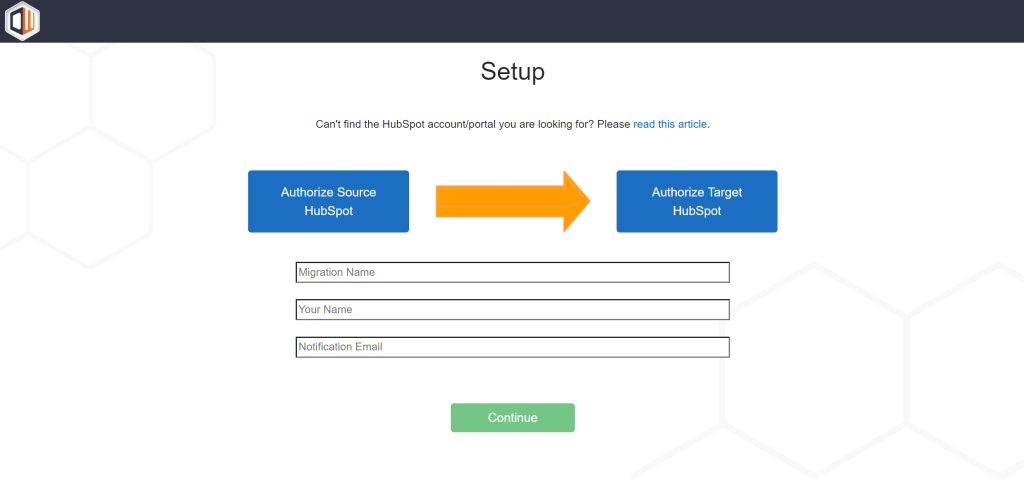
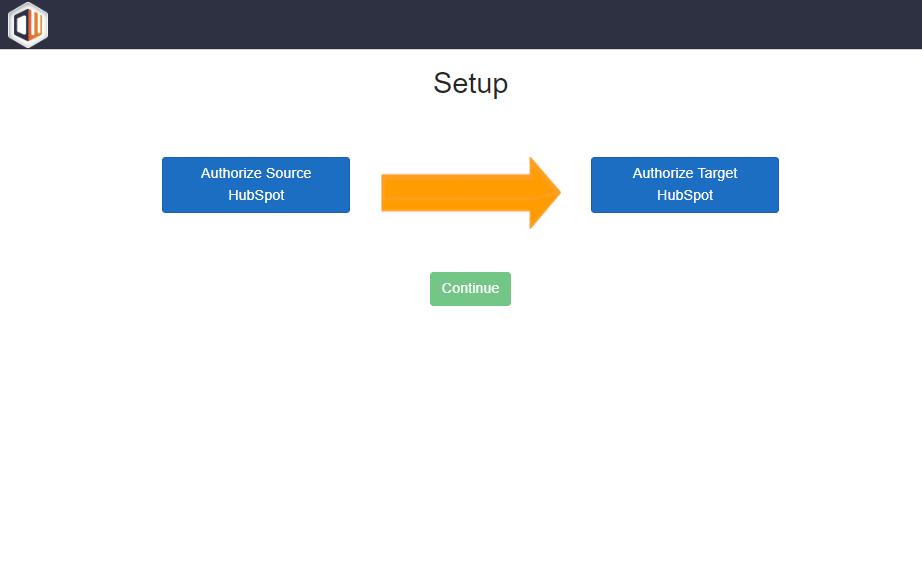
Para configurar uma execução no painel do usuário, clique em Create New Migration (Criar nova migração). Depois de clicar, você será redirecionado para a página de autorização de aplicativos. A partir daqui, você precisa autorizar os portais de origem e destino da HubSpot.
A origem é o local de onde seus dados e esquemas serão migrados. O destino é o local para onde eles serão copiados. Depois de autorizar os dois portais, clique em Continuar para configurar o restante da migração.
Depois de configurar a migração, você será redirecionado para o painel do usuário, onde poderá iniciar a migração sob demanda. Depois de iniciar uma execução, você receberá atualizações por e-mail durante todo o processo e poderá ver as atualizações em tempo real no painel do usuário.
Temos uma extensa documentação de suporte que pode ser encontrada aqui. Se desejar uma demonstração do aplicativo, entre em contato conosco aqui.
O que o Toolkit pode migrar
O Portal Toolkit pode migrar automaticamente os seguintes esquemas e dados entre portais da HubSpot — um número ilimitado de vezes, sempre que necessário.
Execuções ilimitadas: tudo o que foi mencionado acima pode ser migrado quantas vezes for necessário. Consulte o guia de configuração para obter mais detalhes.
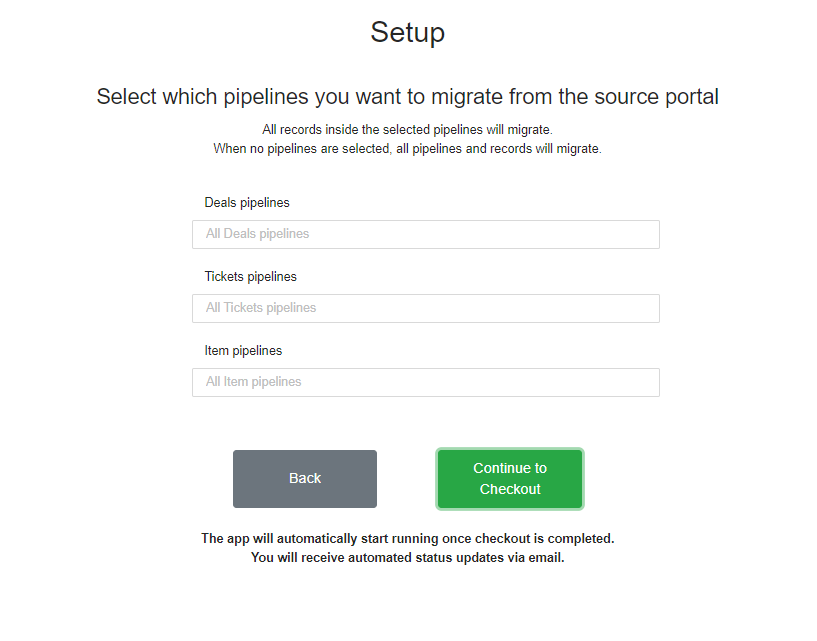
O HubSpot Portal Toolkit é capaz de realizar migrações avançadas ilimitadas, o que permite que os usuários filtrem os dados para atender às suas necessidades avançadas. O aplicativo é capaz de filtrar dados das seguintes maneiras.

Perguntas frequentes
Em que o Toolkit difere dos outros aplicativos do pacote?
O Migrator do HubSpot para o HubSpot realiza uma única migração pontual, enquanto o Portal Sync mantém os portais continuamente sincronizados. O Toolkit é destinado a equipes que transferem dados repetidamente — com execuções sob demanda ilimitadas entre quaisquer portais, incluindo contas de sandbox e de desenvolvedor, além de conteúdo do CMS e histórico, que os outros aplicativos não transferem.
Isso é uma assinatura?
Sim. A cobrança é mensal ou anual, e você pode realizar um número ilimitado de migrações enquanto sua assinatura estiver ativa.
O que o Toolkit pode migrar?
Registros e objetos personalizados do CRM, pipelines e propriedades, interações, arquivos e anexos, esquemas de formulários, segmentos e pastas, conteúdo do CMS, como páginas do site, páginas de destino, blogs, modelos de página e HubDB, além de e-mails de marketing, campanhas, fluxos de trabalho, marcas, proprietários e usuários, moedas e associações entre todos os registros.
Posso filtrar o que será migrado?
Sim. O esquema de migração é totalmente personalizável, e você pode criar, nomear, salvar e enviar conjuntos de alterações sempre que necessário. Filtre por marca, pipeline de negócios, imóveis e grupos de imóveis, formulários, segmentos, fluxos de trabalho e objetos personalizados.
Quantas migrações posso executar?
Número ilimitado — transfira uma quantidade ilimitada de dados e esquemas entre portais quantas vezes for necessário enquanto estiver assinado.
Quanto tempo leva uma migração?
Até 24 horas, dependendo do tamanho do seu banco de dados do HubSpot.
Preciso ser um superadministrador?
Sim. É necessário ser um superadministrador do HubSpot para que o aplicativo funcione.
É seguro e está em conformidade com o GDPR?
Sim. Todos os aplicativos do Datawarehouse.io estão em conformidade com o GDPR, e seus dados são processados nos data centers da Microsoft Azure na região Oeste da UE ou na América do Norte. O Datawarehouse.io está em conformidade com a norma SOC 2, e este aplicativo é certificado pela HubSpot.
Todos os aplicativos do Datawarehouse.io são totalmente compatíveis com o GDPR. Dependendo de onde você estiver no mundo, seus dados serão processados e hospedados nos data centers do Microsoft Azure na região oeste da UE ou na América do Norte.
O Datawarehouse.io é compatível com SOC 2. Você pode ler mais sobre isso aqui.
Esse aplicativo foi certificado pela HubSpot, o que significa que foi submetido a uma revisão de segurança pela equipe da HubSpot.