Always-on B2B reporting
Campaign group, campaign, creative, and lead data refreshes automatically — as often as every 15 minutes — so your dashboards are never stale.
LinkedIn Ads Power BI Connector
Sync your LinkedIn Ads campaign groups, campaigns, creatives, and performance metrics straight into Power BI — no manual CSV exports and no API code. Point-and-click setup in under five minutes.
CONNECT TO POWER BI
What is the LinkedIn Ads Power BI Connector?
The LinkedIn Ads Power BI Connector automatically syncs your LinkedIn Ads data into a dedicated database and surfaces it in Power BI — giving your whole team live B2B campaign dashboards and reporting without manual exports or a single line of API code.
Power BI is Microsoft’s business intelligence platform for interactive dashboards and reports. With the Power BI Connector your analysts can track spend, leads, cost per lead, and pipeline impact alongside the rest of your business data, then refresh it automatically on a schedule you control.
Campaign group, campaign, creative, and lead data refreshes automatically — as often as every 15 minutes — so your dashboards are never stale.
Your LinkedIn Ads data lands in a managed Azure SQL database with tables, keys, and relationships pre-built. Connect Power BI, or any SQL client, directly.
Break performance down by job title, seniority, industry, and company size — the professional targeting data that makes LinkedIn unique — right inside Power BI.
Skip the LinkedIn Marketing API, custom scripts, and manual downloads. Point-and-click setup connects your account in under five minutes.
Power BI Connector
per month · billed monthly
Why Power BI
LinkedIn’s Campaign Manager is built for launching B2B campaigns, not analyzing them. Native reporting stops at campaign- and ad-level views, offers no closed-loop attribution back to revenue, and forces a CSV export the moment you need to combine it with anything else. Piping LinkedIn Ads into Power BI turns that raw campaign data into governed, always-fresh dashboards — and lets you blend it with your CRM and every other channel that matters. Here are some of the things B2B teams build once the data lands in Power BI:
LinkedIn’s edge is professional targeting. Break spend, leads, and conversions down by job title, seniority, industry, and company size to see which segments actually convert — then pour budget into your real ICP.
LinkedIn can’t tell you what a lead was worth. Join Lead Gen Form submissions to your CRM in Power BI to measure cost per MQL, lead-to-opportunity rate, and true pipeline ROI.
Go past LinkedIn’s flat reports. Drill from campaign group to campaign to individual creative in one model to see exactly which messages and ad formats move your audience.
LinkedIn CPMs and CPCs run high, so efficiency matters. Track CPL, CPA, and CPM trends over time and flag rising costs before they quietly drain the budget.
LinkedIn is rarely the last touch. Blend it with Google Ads and CRM data to credit the full funnel and see how your target accounts engage across every channel.
Replace the monthly CSV-and-slides ritual. A Power BI dashboard refreshes on its own, so leadership always sees spend, leads, and CPL without anyone exporting a thing.
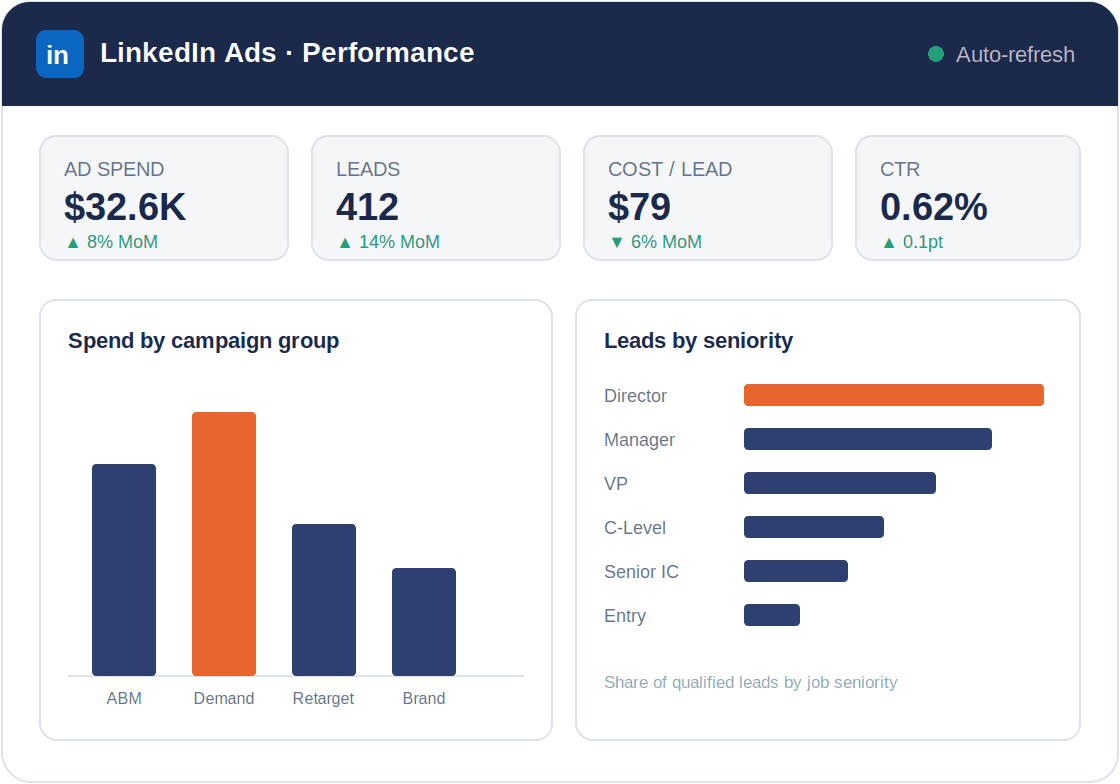
A live Power BI report built directly on your synced LinkedIn Ads data.
How it works
No ETL engineers. No LinkedIn Marketing API code. Point-and-click setup that takes under 5 minutes.
Authenticate your LinkedIn Ads account via OAuth from the Datawarehouse.io app. Ad account or Business Manager access works. Takes under two minutes.
Start your trial and receive your connector credentials from the Datawarehouse.io app. Then add the database as a Data Source in Power BI following the instructions here.
We build all your LinkedIn Ads tables and relationships in the database, then sync your data on your chosen schedule — from every 24 hours down to every 15 minutes.
Your LinkedIn Ads data belongs in Power BI — not locked behind campaign-level reports. Start your free trial today.
Frequently asked questions
Everything you need to know before getting started.
The LinkedIn Ads Power BI Connector by Datawarehouse.io automatically connects LinkedIn Ads to Power BI. It provisions a dedicated database, creates all necessary tables and schemas, and continuously syncs your LinkedIn Ads data — campaign groups, campaigns, creatives, audiences, demographics, and lead metrics — without any ETL engineering.
Datawarehouse.io provisions a dedicated Azure-hosted MS SQL Server database, creates all tables and schemas, then continuously syncs your LinkedIn Ads data on your chosen schedule. Your database credentials are available in the Datawarehouse.io app. Add the database as a Data Source in Power BI and start building dashboards in minutes.
Your sync frequency depends on your plan: Lite syncs every 24 hours, Standard every 6 hours, Advanced every hour, and Max every 15 minutes. Standard, Advanced, and Max users can also set their preferred sync time.
Yes. HubSpot, Google Ads, and other data sources are available from the Datawarehouse.io app, included at no extra cost. Blend LinkedIn Ads spend with CRM revenue and other paid media in a single Power BI model for true cross-channel attribution.
Yes. All Datawarehouse.io apps allow you to add other users to your account or database. Users can be added in seconds through our self service user interface.
Yes. SOC 2 certified and GDPR compliant. All data is encrypted in transit and at rest. Only you have read-only access to your Azure SQL database. LinkedIn Ads authentication uses OAuth 2.0. Data is processed in Azure EU West or North America depending on your billing region.
Yes. Users on the Standard (6-hour), Advanced (1-hour), and Max (15-minute) plans can set their preferred sync time from the Datawarehouse.io app.
No. The connector handles all LinkedIn Marketing API access, pagination, and schema management for you. There is no code to write and no API quota to manage — point-and-click setup connects your account in under five minutes.
Yes. A free trial is available on every plan. A free Power BI dashboard template is also included to help you get started quickly.
Sécurité

Independently audited security controls covering availability, confidentiality, and processing integrity.
All data encrypted in transit and at rest. Only you have read-only access to your Azure SQL database. LinkedIn Ads authentication uses OAuth 2.0.

Data processed in Microsoft Azure EU West or North America depending on your billing region.
Your data lives in its own dedicated Azure SQL database — never shared with other customers. Provisioned, maintained, and backed up for you.


Join 10,000+ teams who’ve eliminated manual exports.